


Lucky Neko gives its Japanese-themed icons distinct values in the paytable. A three-reel drum combination and a three-reel sushi combination can have the same length and still carry different listed values. This cc6 guide compares four of PG Soft’s picture symbols and explains how to read those values alongside the matching ways shown on the reels.
Compare the Main Picture Symbols
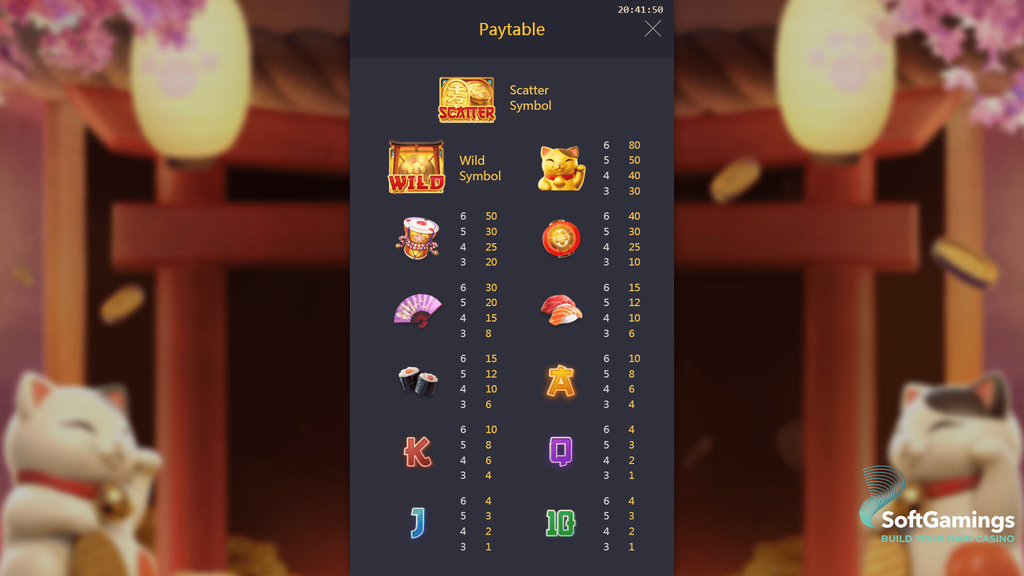
Read across the row for the symbol you matched and stop at the column for its combination length. The figures below are paytable entries. The game works out the displayed cash win using its bet settings, the number of winning ways and any applicable multiplier.
| Symbol | 3 reels | 4 reels | 5 reels | 6 reels |
|---|---|---|---|---|
| Drum | 20 | 25 | 30 | 50 |
| Red coin | 10 | 25 | 30 | 40 |
| Fan | 8 | 15 | 20 | 30 |
| Sushi | 6 | 10 | 12 | 15 |
Check the Combination Length Before Comparing Values
The drum leads the four rows shown at three and six reels. The gap changes across columns. At four reels, the drum and red coin both show 25. At six reels, the drum shows 50 and the red coin shows 40. For cc6 readers comparing screenshots, start with the number of consecutive reels involved, then compare the entries in that column. The regular card ranks have their own rows for the same reason.
Separate Symbol Value from the Number of Ways
If there are two ways to complete a four-reel fan combination, the game uses the four-reel fan entry for both ways. You can think of that as 15 multiplied by two within the paytable calculation, before the game converts the result to cash and accounts for other applicable effects. The cc6 comparison helps explain why a shorter match with several routes can contribute more to a result than a longer match with a single route.
Remember the Two Special Icons
The Wild substitutes for regular symbols on the middle reels, while the Scatter is counted for the free spins trigger. An oversized tile can cover several cells and still count as one symbol when a payout is calculated. Use the live paytable when you want to double-check a particular tile. The cc6 symbol chart is a quick reference for the four picture icons you can compare at a glance.